OLPCities/Mouse over and click: Difference between revisions
Jump to navigation
Jump to search
No edit summary |
No edit summary |
||
| Line 15: | Line 15: | ||
onclickup [=String] The string is the function name to be called |
onclickup [=String] The string is the function name to be called |
||
</pre> |
|||
<b>IMPORTANT: To use any of the last four properties you need to create an object of the Class [[Mouse]] </b> |
|||
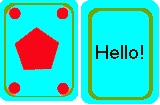
Our exercice will be very easy. We will use "mouse=over" and "mouse-out" to change the face of a card. |
|||
Educational games using pairs of cards are very usual. |
|||
[[Image:Hello.gif |left]] |
|||
To have a so big card over the floor of a Lot is not very real but nothing at the OLPCities is very real :-) |
|||
<p>Look the complete code of the exercice: |
|||
<pre> |
|||
<html> |
|||
<head> |
|||
<script language="Javascript" src="http://www.dmu.com/olpc/gamelib_core.js"></script> |
|||
<script language="Javascript" src="http://www.dmu.com/olpc/gamelib_sprites.js"></script> |
|||
<script language="Javascript" src="http://www.dmu.com/olpc/gamelib_keyboard.js"></script> |
|||
<script language="Javascript" src="http://www.dmu.com/olpc/gamelib_mouse.js"></script> |
|||
<script language="Javascript"> |
|||
Gl_preloader("http://www.dmu.com/olpcavatar/avat1.gif"); |
|||
Gl_preloader("floorW02G0.gif"); |
|||
Gl_preloader("hello.gif"); |
|||
function init(){ |
|||
Sp_linuxcompatible=true; |
|||
mymouse=Ms_initmouse(); //You need this to use mouse-over and click |
|||
avataresc = new Gl_cookie("avatesc"); |
|||
if(avataresc.value == null)avataresc.setvalue("http://www.dmu.com/olpcavatar/avat1.gif"); |
|||
entryt = new Gl_cookie("entt"); |
|||
upkey=Kb_trapkey("UP"); |
|||
downkey=Kb_trapkey("DOWN"); |
|||
rightkey=Kb_trapkey("RIGHT"); |
|||
leftkey=Kb_trapkey("LEFT"); |
|||
av=new Sp_Sprite(); |
|||
av.setImage(avataresc.value,32,32,4,2); |
|||
av.setXlimits(100,610); |
|||
av.setYlimits(80,280); |
|||
if(entryt.value=="E"){ |
|||
av.moveTo( 550,150); |
|||
av.setFrame(0); |
|||
entryt.setvalue("G"); |
|||
} |
|||
else if(entryt.value=="W"){ |
|||
av.moveTo(125,150); |
|||
av.setFrame(1); |
|||
entryt.setvalue("G"); |
|||
} |
|||
else{ //can be null |
|||
av.moveTo( 255,235); |
|||
av.setFrame(3); |
|||
entryt.setvalue("G"); |
|||
} |
|||
av.setFrameByDirection(90,90,1,180,180,3,270,270,0,0,0,2); |
|||
av.setAnimation(0); |
|||
av.setZ(10); |
|||
av.collides=true; |
|||
av.useHitEvents(true); |
|||
av.setAnimationSpeed(3); |
|||
av.switchOn(); |
|||
floor=new Sp_Sprite(); |
|||
floor.setImage("floorW02G0.gif",614,390,1,1); |
|||
floor.setXlimits( 0,614); |
|||
floor.setYlimits( 0,390); |
|||
floor.setFrame(0); |
|||
floor.moveTo(0 , 0 ); |
|||
floor.setZ(5); |
|||
floor.switchOn(); |
|||
hello=new Sp_Sprite(); |
|||
hello.setImage("hello.gif",80,105,2,1); |
|||
hello.setXlimits( 0,614); |
|||
hello.setYlimits( 0,390); |
|||
hello.setFrame(0); |
|||
hello.makeHard(); |
|||
hello.moveTo(160 , 50 ); |
|||
hello.setZ(12); |
|||
hello.onmouseover="hello.setFrame(1)"; |
|||
hello.onmouseout="hello.setFrame(0)"; |
|||
hello.onclickup="hello.switchOff();"; |
|||
hello.switchOn(); |
|||
Gl_hook("timestep()"); // hook our function to change directions into the gamelib |
|||
Gl_start(); |
|||
} |
|||
function timestep(){ |
|||
av.setSpeed(0); |
|||
av.setAnimationRepeat(0); |
|||
if(rightkey.pressed){ |
|||
av.setDir(1,0); |
|||
av.setAnimationRepeat(-1); |
|||
av.setSpeed(2); |
|||
} |
|||
else if(leftkey.pressed){ |
|||
av.setDir(-1,0); |
|||
av.setAnimationRepeat(-1); |
|||
av.setSpeed(2); |
|||
} |
|||
else if(downkey.pressed){ |
|||
av.setDir(0,1); |
|||
av.setAnimationRepeat(-1); |
|||
av.setSpeed(2); |
|||
} |
|||
else if(upkey.pressed){ |
|||
av.setDir(0,-1); |
|||
av.setAnimationRepeat(-1); |
|||
av.setSpeed(2); |
|||
} |
|||
}//timestep |
|||
</script> |
|||
</head> |
|||
<title>TUTCITY </title> |
|||
<body bgcolor="black" onload="init()" > |
|||
</html> |
|||
</pre> |
</pre> |
||
Revision as of 21:16, 25 September 2006
There are two very usual resources that are used when we are working using Sprites: the "mouse-over" and the "mouse-click".
The Class Sprites has four properties that we use:
onmouseover [=String]         The string is the function name to be called when the mouse
                              pointer has moved over the sprite. This CAN include arguments so
                              mySprite.onmouseover="dosomething(x,y,z)" would pass the variables x,y,z
                              to the function dosomething

onmouseout [=String}         The string is the function name to be called

onclickdown [=String]        The string is the function name to be called

onclickup [=String]          The string is the function name to be called
IMPORTANT: To use any of the last four properties you need to create an object of the Class Mouse
Our exercice will be very easy. We will use "mouse=over" and "mouse-out" to change the face of a card.
Educational games using pairs of cards are very usual.

To have a so big card over the floor of a Lot is not very real but nothing at the OLPCities is very real :-)
Look the complete code of the exercice:
<html>
<head>
<script language="Javascript" src="http://www.dmu.com/olpc/gamelib_core.js"></script>
<script language="Javascript" src="http://www.dmu.com/olpc/gamelib_sprites.js"></script>
<script language="Javascript" src="http://www.dmu.com/olpc/gamelib_keyboard.js"></script>
<script language="Javascript" src="http://www.dmu.com/olpc/gamelib_mouse.js"></script>
<script language="Javascript">


Gl_preloader("http://www.dmu.com/olpcavatar/avat1.gif");
Gl_preloader("floorW02G0.gif");
Gl_preloader("hello.gif");

function init(){

 Sp_linuxcompatible=true;
 mymouse=Ms_initmouse(); //You need this to use mouse-over and click

 avataresc = new Gl_cookie("avatesc");
 if(avataresc.value == null)avataresc.setvalue("http://www.dmu.com/olpcavatar/avat1.gif");
 entryt = new Gl_cookie("entt");


 upkey=Kb_trapkey("UP");
 downkey=Kb_trapkey("DOWN");
 rightkey=Kb_trapkey("RIGHT");
 leftkey=Kb_trapkey("LEFT");

 av=new Sp_Sprite();
 av.setImage(avataresc.value,32,32,4,2);
 av.setXlimits(100,610);
 av.setYlimits(80,280);

 if(entryt.value=="E"){
  av.moveTo( 550,150);
  av.setFrame(0);
  entryt.setvalue("G");
 }
  else if(entryt.value=="W"){
   av.moveTo(125,150);
   av.setFrame(1);
   entryt.setvalue("G");
 }
 else{ //can be null
  av.moveTo( 255,235);
  av.setFrame(3);
  entryt.setvalue("G");
 }

  av.setFrameByDirection(90,90,1,180,180,3,270,270,0,0,0,2);
  av.setAnimation(0);
  av.setZ(10);
  av.collides=true;
  av.useHitEvents(true);
  av.setAnimationSpeed(3);
  av.switchOn();

  floor=new Sp_Sprite();
  floor.setImage("floorW02G0.gif",614,390,1,1);
  floor.setXlimits( 0,614);
  floor.setYlimits( 0,390);
  floor.setFrame(0);
  floor.moveTo(0 , 0 );
  floor.setZ(5);
  floor.switchOn();

  hello=new Sp_Sprite();
  hello.setImage("hello.gif",80,105,2,1);
  hello.setXlimits( 0,614);
  hello.setYlimits( 0,390);
  hello.setFrame(0);
  hello.makeHard();
  hello.moveTo(160 , 50 );
  hello.setZ(12);
  hello.onmouseover="hello.setFrame(1)";
  hello.onmouseout="hello.setFrame(0)";
  hello.onclickup="hello.switchOff();";
  hello.switchOn();

  Gl_hook("timestep()");	// hook our function to change directions into the gamelib
  Gl_start();
}


function timestep(){
    av.setSpeed(0);
    av.setAnimationRepeat(0);
   if(rightkey.pressed){
     av.setDir(1,0);
     av.setAnimationRepeat(-1);
     av.setSpeed(2);
   }
   else if(leftkey.pressed){
    av.setDir(-1,0);
    av.setAnimationRepeat(-1);
    av.setSpeed(2);
   }
   else if(downkey.pressed){
    av.setDir(0,1);
    av.setAnimationRepeat(-1);
    av.setSpeed(2);
   }
   else if(upkey.pressed){
    av.setDir(0,-1);
    av.setAnimationRepeat(-1);
    av.setSpeed(2);
   }


 }//timestep


</script>
</head>

<title>TUTCITY  </title>
<body  bgcolor="black"  onload="init()" >
</html>